Product · November 16, 2026
Treat coverage like a progress report and not a final grade
A note on what Premiere.Studio's coverage feature is for, and how to read the progress report on a draft without turning it into a final grade.
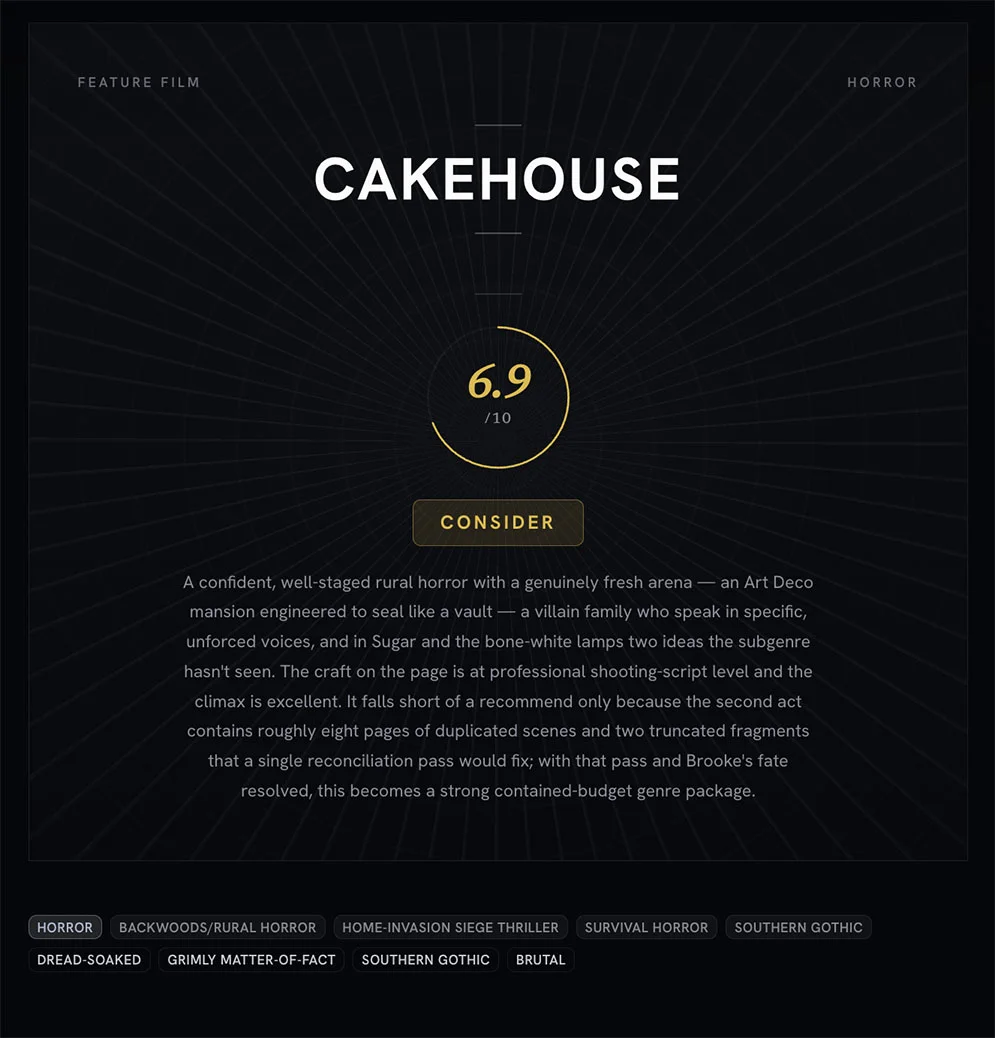
For-your-consideration season is in full swing, the PDFs go up, and for a month or so everyone in the business reads them and says what they think. That makes it a good moment to say what coverage is actually for. Coverage generation has been in Premiere.Studio for a while, and I run it on my own drafts. I've also caught myself treating it as a final grade when, in Premiere.Studio at least, it should be more of a progress report. Treating it as a progress report shows you what's there so you can change it before you send it on its way. A final grade tells you what you are and closes the case. Coverage should work like the first. Here's what I mean.
What coverage is for
Coverage started as a triage tool. A reader at a company gets a stack of scripts, reads them, and writes up what happened and whether the company should care. The report is for the person who did not read the script. It was never written for the writer.
That origin is why the form ends in a judgement. Somebody upstairs needs a one-word answer. The summary, the character notes, the paragraph on structure, all of it exists to justify that word to an executive with only a single minute to spare for the chore.
When you run coverage on your own draft, the situation is inverted. You have read the script. You do not need the summary to learn the plot. What you need is the part that is hard to get any other way: evidence of how the pages land on someone who is not you. That is the mirror. The verdict at the end is the least useful thing in the document, because you are not deciding whether to buy your own script.
What writers want it to do instead
Here is what I actually want when I hit generate at eleven at night on a draft I have been living with for weeks or even months. I want to be told it is good. Failing that, I want to be told it is bad in a way so specific that fixing it becomes painfully clear.
Neither of those is on offer. A reader's reaction is not a measurement. Run the same pages past three readers and you may get three overlapping but distinct documents, and the overlap is the only part you can trust. One report is one reading.
The damage shows up in what happens next. A writer who reads a strong report stops revising, because the work has been certified. A writer who reads a weak one stops revising for the other reason. Both of them have taken a reading and treated it as a result.
Read for pattern, not score
So I read the report backwards. I skip whatever sits at the end that looks like a grade, and I go to the places where the report describes what it understood.
The summary is the most useful section in the document, and almost nobody treats it that way. If the plot summary is subtly wrong, that is not the reader failing. That is the script. Somewhere in there the causality is thin enough that a careful reading picked up the wrong thread. Find that page.
Same with character. If the report describes your protagonist's want in terms you did not intend, you have learned something concrete about what the pages are transmitting versus what you think they are. I write down the mismatch, not the opinion.
Then I look for repetition. One note about the second act is noise. The same concern showing up in the summary, in the character section and again in the structural notes is a pattern, and patterns are worth a rewrite. I only act on what appears in more than one place.
When to run it, when to wait
Coverage needs a complete draft. Not a good one. A complete one, beginning to end.
On a partial draft the report will tell you the second half is underdeveloped, which you already knew. On a first complete draft it is genuinely useful, because that is the point where you have stopped being able to see the thing whole.
I run it twice on a script, usually. Once after the first complete draft, to find out what is getting through. Once after the pass that fixed those things, to check whether I fixed them or moved them.
Here are some pointers:
- Run it when the draft has an ending, even one that you're not quite sure is right yet.
- Wait if you already know what is broken and are on your way to fix it.
- Wait if you are running it hoping for reassurance. You will not get it, or you will get it and it will not help.
- Run it before you send the script out, so the first reading that surprises you is not one that counts.
Where this sits in the Studio
Coverage generation runs on a draft in Premiere.Studio and comes back as a report inside the project.
Like the other AI features, it uses credits, so it rewards being deliberate about when you run it. That constraint has been good for me. It stops me from generating a report every time I make a simple change. You, of course, can do this however if you wish.
What it does not do is decide anything. It reads the pages and tells you what it found there.
The reason to say this now is that the next eight weeks will be loud. The screenplay PDFs are out. The Black List arrives in December, the shortlists follow, and year-end lists will tell you what was good. All of it is judgement, and none of it is about your draft.
If you are in the middle of a September draft, or finishing something for a January application deadline, the useful move is the unglamorous one. Get to a complete draft. Then read a report for the places it misunderstood you, and go fix those pages.
That is all coverage is for. It shows you the script as it currently reads and what you do about that is still up to you. You are the reason this tool exists in the first place and I'm grateful that you're here checking it out. If you have any questions about, or suggestions for, this feature or another then feel free to email me at Support@Premiere.Studio. I'd love to hear your feedback.
— Justin
More from the Newsroom
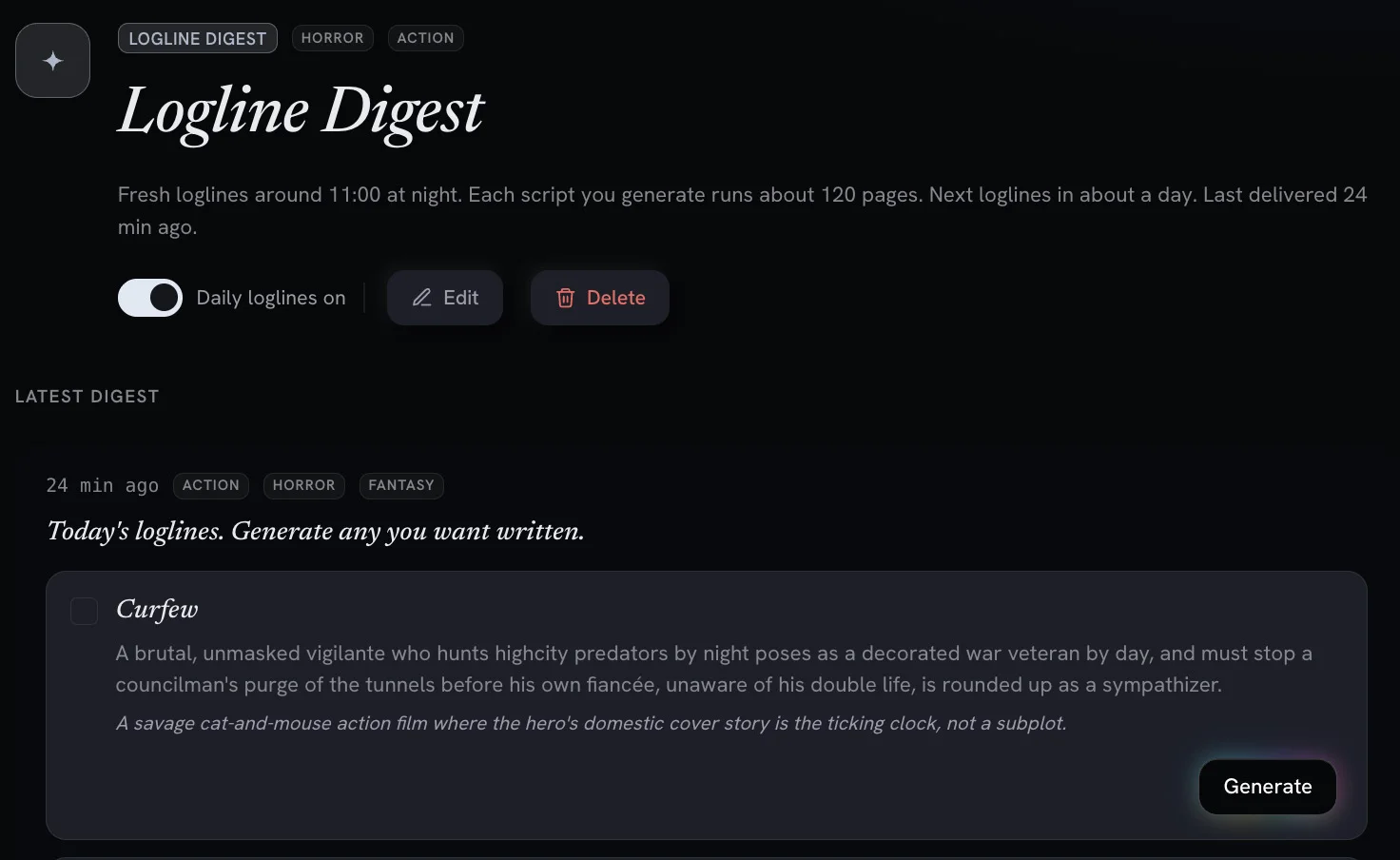
Digests and Workflows: AI Powered Screenwriting Automation Tools
Recurring, automated workflows deliver daily logline previews and digests you can turn into full feature scripts with one click.

What actually changes when you turn scattered notes into an outline
Most of us keep a script in five places at once. Here is how I move a pile of notes onto the Premiere.Studio outline board, and when I leave the pile alone.

Introducing Premiere.Studio
Premiere.Studio is an intelligent screenwriting platform built for limitless creativity. Unleash your imagination with advanced AI-powered toolsets designed to elevate your storytelling by removing the friction of writing conventions, leaving you free to focus entirely on the story.